


Romantic Love Emoji WAStickers
3.78.00 Reviews
App Specs
- Version
- 1.48
- Updated On
- License
- Free
- Downloads
- 1,000,000+
- Developer
- Kalmzee
- Categories
- Communication
- Platform
- Android
Screenshots

 Analysis by AppCompare
When plain hearts and familiar smileys start feeling repetitive, a dedicated romantic sticker collection can give a chat a warmer, more playful voice. That is the appeal of Romantic Love Emoji WAStickers: it focuses on affectionate visuals for WhatsApp rather than trying to replace your messaging app. I see it as a small, practical extra for people who already enjoy sending stickers, though its narrow theme means it will not suit every conversation or every user.
Expressing Love with Stickers
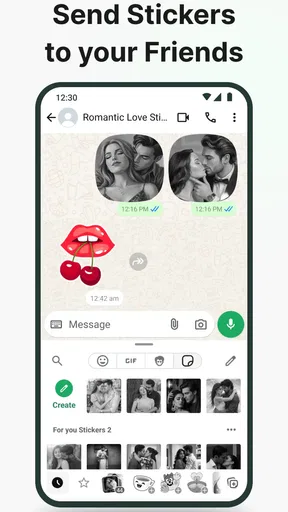
So, you’ve got your basic smileys, maybe a heart or two, but what if you want to up your game in the romance department? That’s where Romantic Love Emoji WAStickers comes in. It’s a Communication app from Kalmzee, built around a collection of romantic and affectionate stickers for WhatsApp. The basic idea is appealingly direct: choose a visual that fits the mood, add it to WhatsApp, and use it in a conversation without composing a long message.
Simple Yet Sweet Interface
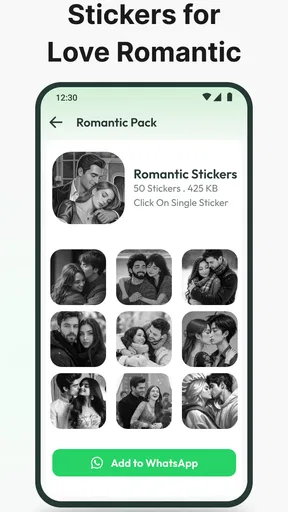
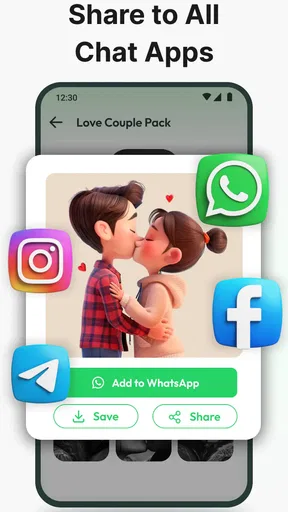
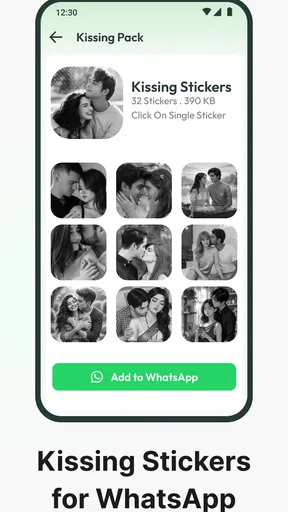
First things first, let’s talk about the interface. It’s as straightforward as it gets. No clutter, no unnecessary buttons—just a clean layout that makes it super easy to browse through the sticker packs. With just a few taps, you can add the stickers to your WhatsApp and start sending them right away. It’s practically foolproof, which is great for those of us who aren’t exactly tech-savvy.
That simplicity is especially useful when you only want to pick something quickly. Rather than treating the app as a place to spend time, I’d use it as a small selection step: open it when a suitable moment comes up, choose a sticker, and return to the chat. If you are installing it for someone less comfortable with phone settings, the short path from browsing to adding a pack is a welcome advantage. The main trade-off is that a focused, uncomplicated layout gives you less reason to keep exploring once you have found a few designs you like.
A Sticker for Every Feeling
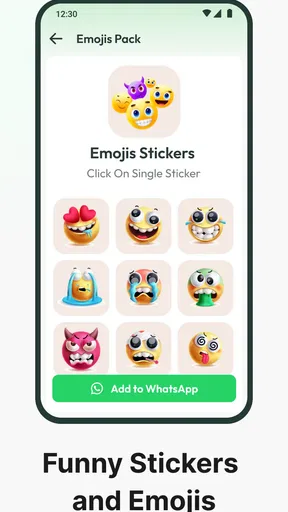
One of the standout features of this app is its variety. Whether you’re feeling flirty, sentimental, or just plain goofy, there’s a sticker for that. The designs range from sweet little hearts and affectionate animals to humorous and cheeky expressions that are sure to bring a smile to anyone’s face. It turns your chats into a canvas for creativity and connection.
The most useful way to think about that variety is as a tone selector, not a substitute for what you want to say. A playful design can soften a teasing message, while a tender one can make a quick check-in feel more personal. I would still pair a sticker with words when the message matters; an image can add warmth, but it may not communicate exactly what you intend. A joke that feels charming in one relationship could feel too forward in another, so I’d choose based on the recipient rather than send the most attention-grabbing option by default.
Seamless Integration
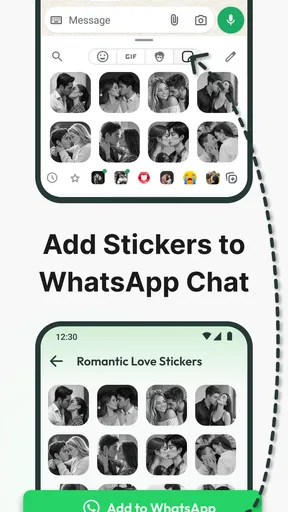
Adding these stickers to your WhatsApp is a breeze. Once installed, the sticker packs integrate smoothly with your existing collection. You can access them directly from your WhatsApp, making it incredibly convenient to spice up any conversation. It’s a seamless experience that feels like a natural extension of the app itself.
Worth Reading Before You Choose

EA SPORTS FC Mobile 26 Is a Bigger Football Game, but It Takes Time

Flipboard Shows What News Apps Must Do Beyond the Feed

Switching to Android Auto Means Rethinking Your Driving Routine

Google Calendar Makes a Crowded Week Easier to Manage

Ludo King Makes the Most of the Minutes Between Plans

Baby Panda World Brings Quick Play to Modern Phones, but Its Game Library Feels Busy
A helpful habit is to add only the pack or packs you expect to use, then check how they sit alongside the stickers you already have. That keeps your WhatsApp selection easier to scan when you are replying quickly. It also helps you judge whether the collection genuinely adds something distinct or simply duplicates hearts and expressions you already send. Since the point is fast access from a chat, a sticker that looks appealing in the browsing screen is only useful if you can recognize and find it easily later.
Perfect for Everyday Moments, Not Every Message
What I love most about Romantic Love Emoji WAStickers is its versatility. Whether it’s a special occasion like an anniversary or just a regular day when you want to let someone know you’re thinking of them, these stickers are a perfect fit. They’re a fun, visual way to express emotions that words sometimes can’t capture.
For a realistic everyday use, imagine you are between errands and want to let your partner know you are thinking of them, but you only have a moment to reply. A quick affectionate sticker can make that short exchange feel less abrupt. Later, if you are arranging plans or discussing something serious, plain text is likely clearer; the sticker can come afterward as a friendly sign-off rather than carrying the whole message. That distinction matters because the app is strongest as a light conversational accessory, not as a tool for handling every emotional moment.
It can also suit friends who already share a playful style, or someone who wants a small visual flourish for a cheerful greeting. I would be more selective with a new contact, a work conversation, or a person whose sense of humor I do not know. Romantic imagery can be misread when the relationship is not close, and even a silly sticker can seem overly intimate without context. A little restraint makes the collection more useful: send one when it adds meaning, rather than turning every reply into a sticker message.
How It Compares with Other Ways to Personalize Chats
Compared with the standard emoji keyboard, a sticker pack gives a message a larger, more illustrated presence. That can make affection or humor easier to notice, but it also takes up more visual space and can feel excessive in a fast, practical exchange. Compared with WhatsApp’s usual sticker options, a themed collection is more convenient when you want romantic imagery in one place; the downside is that it is less flexible than a broad set covering reactions, hobbies, and everyday subjects.
Making your own stickers is another alternative, especially if you want an inside joke or a personal image that a general collection cannot provide. That route takes more effort, while this app is aimed at people who would rather choose from ready-made designs. I would pick a custom option for a specific personal reference and this one for quick, familiar expressions. If you rarely send stickers, the built-in emoji keyboard may already do the job without adding another app to your phone.
Who Will Get the Most from It
The app makes the most sense for WhatsApp users who regularly message a partner or close friends and enjoy affectionate, cartoon-like visuals. It is free, has an average rating of 3.7 from around 4.2 thousand ratings, and has been installed over a million times. Those figures suggest that it has found an audience, but they are not a guarantee that its style will match yours; the best test is whether you actually enjoy using themed stickers in your normal chats.
It is rated Teen, and it is a focused communication utility rather than a full messaging service. The current version is 1.48, and it supports devices running Android 7.0 or later. I would recommend checking those basics before downloading, particularly if you are setting it up on an older phone. People looking for a general-purpose sticker library, extensive personalization, or stickers that work across different messaging platforms should compare other options instead of choosing this solely for its romantic theme.
Kalmzee keeps the concept focused, which helps the app stay approachable. That focus is also its clearest limitation: if you want neutral reactions, work-appropriate images, or a collection built around many interests, a broader sticker source will probably serve you better. I would not install it expecting a full chat experience or a way to express complex feelings automatically. Its value depends on whether a handful of affectionate images would genuinely fit the way you already communicate.
Small Trade-Offs Before You Add a Pack
One practical question is whether a sticker will be easy to locate after you add it. I’d try a few designs in a low-pressure chat first and notice which ones are memorable at a glance. If you find yourself searching through the WhatsApp sticker area or repeatedly choosing the same generic heart, the collection may not be saving you much effort. A quick trial is more useful than assuming that a large-looking assortment will become part of your routine.
Another consideration is context. A sticker can be a friendly nudge, but it cannot show the nuance of an apology, explain a change of plans, or settle a misunderstanding. In those situations, I’d write the message plainly and use an image only if it supports the tone. Likewise, affectionate designs are best sent where that style is welcome; the same visual can feel sweet to a partner and awkward in a group or unfamiliar conversation.
There is also a small difference between adding a sticker pack and sending an ordinary emoji: a sticker is more conspicuous. That is a strength when you want a message to stand out, but a drawback when the conversation is moving quickly or the other person prefers understated replies. I’d treat these designs like punctuation with personality—useful in the right place, distracting when inserted into every line.
Wrapping it Up
In a world where digital communication reigns supreme, having a tool like Romantic Love Emoji WAStickers can make a big difference. It adds a personal touch to your messages, making them more lively and heartfelt. Plus, who doesn’t love a cute sticker?
If you’re on the hunt for a simple yet effective way to inject more emotion and fun into your chats, give this app a shot. It’s a small addition that makes a big impact, and honestly, it’s just plain fun to use. So go ahead, download it and let the sticker-filled adventures begin!
My recommendation is specific: try it if romantic stickers are already part of how you talk on WhatsApp and you want a dedicated source of them without building a collection yourself. Skip it if you prefer plain text, need a wide range of unrelated themes, or want a personal design rather than ready-made imagery. Used selectively, it can brighten a quick note; used as a stand-in for clear conversation, it will disappoint. For the right kind of chat, though, that modest role is exactly what makes it handy.
Pros
- Wide variety of romantic stickers.
- Easy integration with WhatsApp.
- High-quality
- vibrant images.
- Regular updates with new stickers.
- User-friendly interface.
Cons
- Limited to WhatsApp usage.
- No customization options.
- Requires frequent updates.
- Ads can be intrusive.
- No search feature for stickers.
FAQs for Romantic Love Emoji WAStickers
What is Romantic Love Emoji WAStickers?
Romantic Love Emoji WAStickers is an app designed to enhance your messaging experience with a variety of love-themed stickers. It's perfect for adding a personal and romantic touch to your conversations on WhatsApp. The app provides a wide range of stickers featuring hearts, couples, and romantic quotes.
How do I install Romantic Love Emoji WAStickers on my device?
To install Romantic Love Emoji WAStickers, visit the Google Play Store or Apple App Store on your Android or iOS device, respectively. Search for the app, then click 'Install.' Once the installation is complete, open the app and add the sticker packs to your WhatsApp for immediate use.
Are there any in-app purchases or ads in Romantic Love Emoji WAStickers?
Romantic Love Emoji WAStickers is generally free to download, but it might contain in-app purchases for unlocking premium sticker packs. Additionally, users might encounter ads within the app. These purchases and ads help support the developers in maintaining and improving the app.
Is Romantic Love Emoji WAStickers compatible with all versions of WhatsApp?
Romantic Love Emoji WAStickers is compatible with most versions of WhatsApp, particularly the latest ones. However, it’s always a good idea to ensure your WhatsApp is updated to the latest version to avoid any compatibility issues and to enjoy a seamless experience.
How can I add the stickers to my WhatsApp?
After installing Romantic Love Emoji WAStickers, open the app and browse through the available sticker packs. Tap on the ones you like, and you'll see an option to add them to WhatsApp. Tap 'Add to WhatsApp,' and the stickers will be integrated into your WhatsApp sticker collection.


